

Turn any tablet into
a walk-up task board.
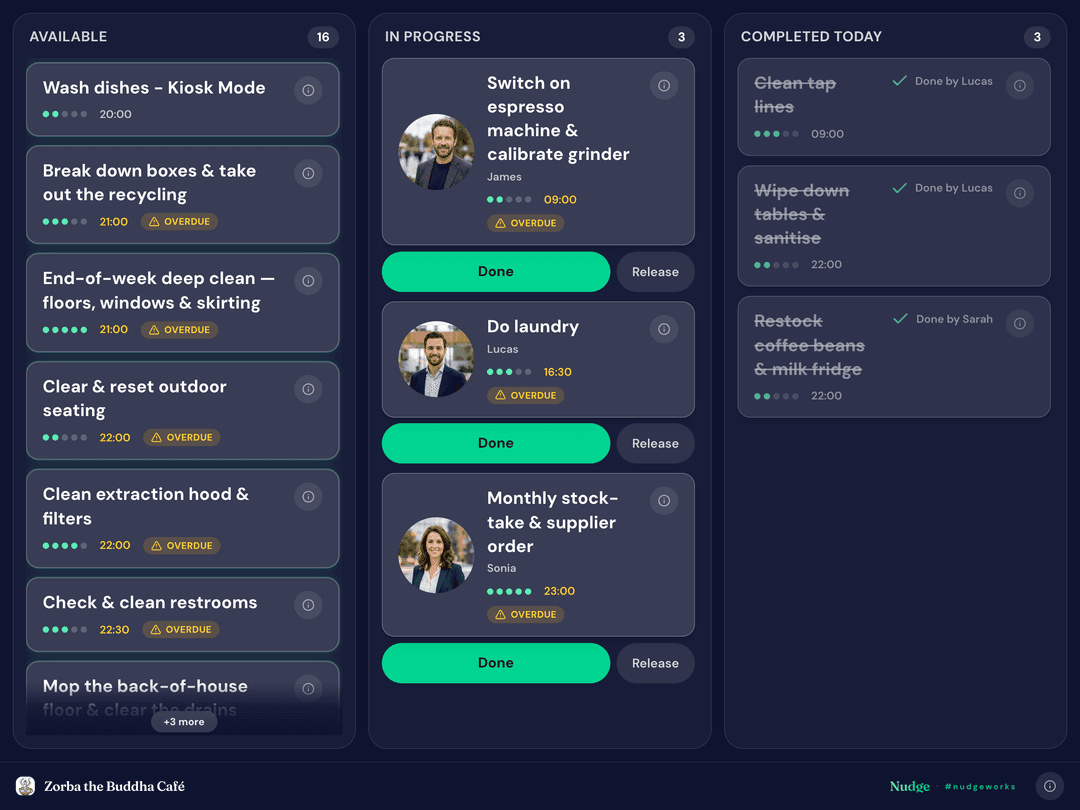
Mount a shared tablet at your venue. Staff walk up, tap their name, claim a job and mark it done — no logins, no installs, no excuses.
Included with Flow (early access) and Circle
Three steps to a live kiosk.
Activate Kiosk Mode
Flip the switch for your space in the Nudge app, then set the PIN, auto-lock and session expiry that fit your venue.
Link a tablet
Scan the tablet's QR code with the Nudge app — WhatsApp-Web style — or open the link and enter the PIN. Paired in seconds.
Let the team walk up
Staff tap their name, claim a job and complete it. You see every claim and completion live, wherever you are.
Everything a shared device should be.
Walk-up claiming
No logins, no accounts on the device. Staff tap their name and the job is theirs — first tap wins, so nothing gets done twice.
QR device pairing
Pair a tablet by scanning its QR code with the Nudge app. Passwords and credentials never touch the shared device.
Real-time manager control
Watch claims and completions land live. Release a stuck job or reassign it from your phone — no need to walk to the tablet.
Fairness Score credit
Work claimed at the kiosk counts like work done in the app. Every completion feeds the same Fairness Score, so effort stays visible.
Locked down & secure
A 4-digit PIN, automatic locking and session expiry keep the device safe — and you can revoke a tablet from the app at any time.
Immersive ambient display
Between taps, the kiosk becomes a calm, glanceable board of the day's work — designed to look good on your counter.
A business feature, included where it counts.
Kiosk Mode ships with Nudge's business plans — no add-ons, no per-device fees.
Flow
Early accessIncluded with Flow during early access — activate it for your space and run a kiosk today.
Circle
BusinessBuilt into Circle, alongside manager roles, shift handover and the rest of the business toolkit.
Put the day's work on the counter.
Activate Kiosk Mode, pair a tablet and let your team claim their work — you'll see it all live.